Skip to the contentCalculator SIMSearch the exhibitsSign in
☰

Z80 Systems · Toshiba · 1981

Toshiba T100 and Pasopia

Toshiba's Z80 personal computer in its two versions, the T100 for export and the Japanese Pasopia: T-BASIC in ROM, CP/M on floppy, and a library of period software.

Library

Article · RML packt100.docs.about-the-pasopia1.0.0Show the pack

About the Toshiba Pasopia PA7010

About the Toshiba Pasopia PA7010: the Japanese original of the T100 (1981) and what sets it apart.

The Pasopia PA7010 is the machine the T100 was made from. Toshiba announced it in Japan in the autumn of 1981 (ASCII, preface); the T100, model number PA7010U, is its export version, shown at the Winter Consumer Electronics Show in January 1982 (MAINT Table 1.4.1; CC83). The two are one machine with different things plugged in: the chips, the ports and the key matrix are the same (ASCII fig. 1-2-8 and TECHREF p.22 draw the same wiring). This exhibit therefore has both as two models of one exhibit; the machine's name in its bar is the menu that chooses.

What the Pasopia has that the T100 has not
Pasopia PA7010T100
Announcedautumn 1981, Japan (ASCII, preface)January 1982, Winter CES (CC83 p.10)
System ROMthe Japanese T-BASIC 1.1, by Microsoft (the ROM's banner)T-BASIC 1.1 in its export version; two of the four 8 KB banks are identical to the Pasopia's (EXPLORE)
CharactersJIS X 0201: the Latin letters with ¥ and the overline, katakana, block and line graphics, 247 characters of 8 x 8 dots (ASCII ch.3 p.91; the character ROM itself)Greek letters and mathematical symbols where the Pasopia has katakana (PROGREF Appendix C)
KeyboardJIS: kana legends on the keys, a カナ key, TAB in the top row, a one-row RETURN (ASCII fig. 1-2-8, fig. 5-3-2)US legends and GRAPH legends

The カナ key is a plain key of the matrix, not a mechanical lock: the ROM switches kana mode on each press (ASCII §1-2-4). In kana mode the letter keys type katakana.

Its software

Toshiba and Japanese publishers sold programs for the Pasopia on cassette. The collection holds six of them as reference copies, all of 1982: Toshiba's Pasopia Game Collection (PA 6002), Pasopia Game Highlight (PZA-410) and Pasopia Sample Programs (PZA-383), Hudson Soft's Pasopia Derby (T-1030) and Part-Timer's Pay Calculator (T-3010), and Micro Cabin's The Golf (T-201) (LIB). They load from the cassette deck in T-BASIC. The disks of the T100 run on the Pasopia as well, CP/M 2.2 among them: the drive unit and its format are the same.

In this exhibit
  • The ROMs are the Pasopia's own: the Japanese T-BASIC 1.1 and the character generator, each a pack of its own that the exhibit requires for this model. Without the character ROM the emulator would draw its own JIS X 0201 set.
  • The keyboard on screen carries the Pasopia's legends; what each key types plain, with SHIFT and in kana mode was observed on the running ROM for every key of the typewriter block and agrees with the ASCII book. On the computer's keyboard the カナ key is F11 (or a Japanese keyboard's kana key).
  • Each model keeps its own settings and saved states; the disks and tapes are shared between the two.
Conflicts and gaps
  • The character ROM's origin. Two different images of the Pasopia's font are in circulation; the one used here came with the system ROM from one archive item, and its origin beyond that item is not known (EXPLORE).
  • The Kanji ROM of the Pasopia is not part of this exhibit.
  • Not in the Library yet: the Pasopia's own Japanese manuals, its price and the numbers built.
Sources
KeySource
ASCIIASCII Technical Bank, Pasopia no naibu kouzou, 1983: t100.collection.t100-hardware, docs/ascii-pasopia-no-naibu-kouzou-1983.pdf
TECHREF, MAINT, PROGREFthe T100's Technical Reference, Maintenance Manual and Programmer's Reference: t100.collection.t100-hardware
CC83Creative Computing, November 1983, the T100 review; linked among this exhibit's web resources
LIBthe exhibit's own software library (the cassettes' entries with their publishers' numbers)
EXPLOREthe project's exploration report of 1 November 2026 (documentation/t100/EXPLORATION-REPORT.md)

Article · RML packt100.docs.about-the-t1001.0.0Show the pack

About the Toshiba T100

About the Toshiba T100: Toshiba's Z80 personal computer of 1982, the Western twin of the Pasopia.

The Toshiba T100 is the Western twin of the Pasopia PA7010, a Z80 personal computer that Toshiba announced in Japan in the autumn of 1981 (ASCII). The export machine carries the model number PA7010U (MAINT) and was shown at the Winter Consumer Electronics Show in January 1982 (CC83). It starts in a Microsoft BASIC from its ROM, runs CP/M 2.2 from an external drive unit, and takes program and memory cartridges in two slots.

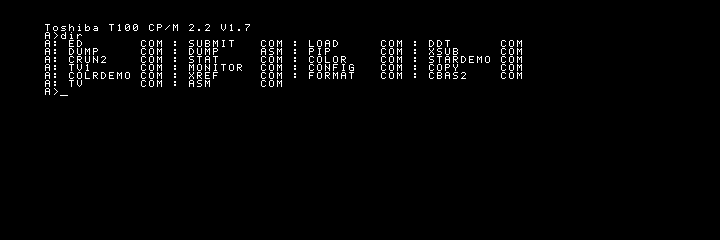
CP/M 2.2 V1.7 on the T100: the directory of Toshiba's system disk (screenshot of this exhibit, the screen's own 720 x 240 pixels)

Toshiba's CP/M 2.2 V1.7 system disk in drive A:, as the T100 of this exhibit shows its directory (SHOT-CPM).

At a glance
FactValue
MakerToshiba Corporation, Tokyo (MAINT, TECHREF)
ModelT100, model number PA7010U; the Japanese original is the Pasopia PA7010 (MAINT Table 1.4.1, ASCII)
Announcedthe Pasopia in autumn 1981 (ASCII, preface); the T100 at the Winter CES, January 1982 (CC83 p.10)
ProcessorZ80A at 3.9936 MHz, a quarter of the board's 15.9744 MHz crystal (TECHREF pp.6-8)
Memory64 KB RAM; a 32 KB system ROM in four 8 KB chips with T-BASIC 1.1 and the loader (TECHREF pp.10-13)
Screentext 36 x 24 and 80 x 25, graphics 160 x 100, high resolution 640 x 200, eight colours (TECHREF pp.27-43)
Drivesthe PA7200U unit: two 5.25 inch double-sided drives, 35 tracks a side, 16 sectors of 256 bytes, 286,720 bytes formatted (MAINT Table 1.3.2, TECHREF p.54)
Slotsa ROM PACK and a RAM PACK (TECHREF pp.14-17)
Other portsa printer port, an audio cassette interface, RS-232C (TECHREF pp.47-53)
SystemsT-BASIC 1.1 in ROM; CP/M 2.2 V1.7 and T-DISK BASIC 1.0 on disk (the disks themselves)
The hardware

The processor board. A Z80A runs at 3.9936 MHz (TECHREF pp.6-8). A Z80 CTC keeps the system timer, 64 times a second, and its second channel makes the speaker's tone through a divider; a Z80 PIO scans the keyboard matrix and gates the speaker; the two sit in the Z80's interrupt daisy chain, the CTC first (ASCII §1-2-5, fig. 1-2-10 to 1-2-12; TECHREF pp.18-22). Three 8255 interface chips carry the rest: two stand between the processor and the video memory, the third drives the printer's strobe, the cassette recorder, the serial lines and the memory mode (TECHREF pp.14-17).

Memory. The lower half of the 64 KB address space holds the system ROM after power-on; a write to a mode port switches RAM in over it, which is how CP/M gets its 64 KB (TECHREF pp.10-13). A ROM PACK in slot 1 takes the ROM's place at power-on.

The screen. An HD46505S CRT controller draws from 16 K words of video memory, each word nine bits wide: eight of data and one attribute bit. The processor reaches that memory only through the 8255s, and only while the beam is in the horizontal retrace, so the picture never tears (TECHREF pp.27-43). In the high-resolution mode a word is a pattern of eight dots, and the cell takes its colour from the last attribute written: eight colours on a 640 by 200 screen, with the colour clash that follows from it. The eight colours are the fixed primaries of a three-bit digital signal: black, blue, red, magenta, green, cyan, yellow, white (TECHREF p.29).

The character set. Where the Pasopia shows katakana, the T100 has Greek letters and mathematical symbols; both have block graphics (PROGREF Appendix C).

The drive unit. The PA7200U holds two 5.25 inch double-sided drives on an NEC µPD765 controller. The T100 polls the controller with interrupts off and ends each transfer with a terminal-count pulse of its own (TECHREF pp.54-57). The first track of side 0 is recorded in single density and holds no data (the notes in the emulator's disk format, from T-DISK BASIC's FORMAT program).

The software

With a system disk in drive 1 at power-on, or after RESET, the loader in the ROM starts the system on the disk instead of T-BASIC (OWNERS). Toshiba's system disk of 1982 is CP/M 2.2 V1.7 with Compiler Systems' CBASIC 2; T-DISK BASIC 1.0 is the second system Toshiba supplied on disk. Both disks survive as images (IA-DISKS) and run in this exhibit.

WordStar 3.00 from MicroPro runs under CP/M once its terminal codes are installed for the T100's screen, as MicroPro's installation manual describes (WS-INSTALL ch.7, App.E). The Library's software shelf has it installed that way.

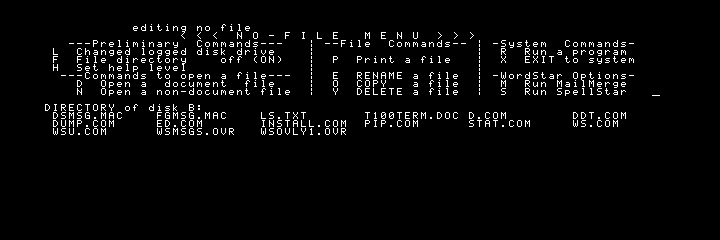
WordStar 3.00's No-File menu on the T100, started from drive B: under CP/M 2.2 (screenshot of this exhibit)

WordStar 3.00 on the T100, started from the disk in drive B: (SHOT-WS).

How it was received

Creative Computing reviewed the T100 in November 1983 and ran David Ahl's simple benchmark on it: one minute and nine seconds (CC83 pp.10, 259). Owners of surviving machines measure 68 to 72 seconds (EXPLORE).

What survives

Few T100s are known. The system ROM was read from a collector's own machine in October 2021 and published in February 2026 as four 8 KB images; two of its four banks are identical to the Japanese Pasopia's T-BASIC 1.1 (EXPLORE). No dump of the T100's character generator exists: the processor cannot read that ROM, so the chip itself has to be read (EXPLORE). The owner's manuals, the programmer's reference, the technical reference written by Toshiba Australia in 1985 and the maintenance manual survive as scans and stand in this Library (HW).

Conflicts and gaps
  • The year. The Pasopia is of 1981, the T100 of 1982; the technical reference in the Library is of 1985 and the maintenance manual of 1983 (HW).
  • The character ROM's type is given differently by the documents and by later notes; no reading of the chip settles it (EXPLORE).
  • Not in the Library yet: the price, the numbers built, the people who designed it, and the vendors' data sheets of its chips.
Sources
KeySource
ASCIIASCII Technical Bank, Pasopia no naibu kouzou (The Internal Structure of the Pasopia), 1983: t100.collection.t100-hardware, docs/ascii-pasopia-no-naibu-kouzou-1983.pdf
TECHREFToshiba T100 Technical Reference Manual, Toshiba Australia, 1985: t100.collection.t100-hardware, docs/toshiba-t100-technical-reference-australia-1985.pdf
MAINTToshiba T100 (Pasopia) Maintenance Manual PAD8120-1, 1983: t100.collection.t100-hardware, docs/toshiba-t100-maintenance-manual-pad8120-1.pdf
OWNERSToshiba T100 Owner's Manuals (US, PAD8111-1 set, 1982; Toshiba Australia, 1983): t100.collection.t100-hardware
PROGREFToshiba T100 Programmer's Reference Manual (T-BASIC), PAD8111-1 set, 1982: t100.collection.t100-hardware
HWthe pack t100.collection.t100-hardware as a whole
WS-INSTALLMicroPro, WordStar 3.0 Installation Manual, May 1981: t100.collection.cpm-software
CC83Creative Computing, vol. 9 no. 11, November 1983: the T100 review (p.10) and the benchmark comparison (p.259); linked among this exhibit's web resources, not held in the Library
IA-DISKSthe packs t100.disk.cpm22 and the T-DISK BASIC image of the emulator's tests, from the Internet Archive
EXPLOREthe project's exploration report of 1 November 2026 (documentation/t100/EXPLORATION-REPORT.md), which records the ROM dump's origin, the owners' benchmark times and the search for a character ROM
SHOT-CPM, SHOT-WSscreenshots of this exhibit, layers of t100.disk.cpm22 and t100.bundle.cpm22-wordstar

Article · RML packt100.docs.about-this-emulator1.0.0Show the pack

About this emulator: the Toshiba T100

About this emulator: how the museum's Toshiba T100 and Pasopia were built, clean-room, around Toshiba's own ROMs.

The museum's T100 and Pasopia are one emulation of the whole machine in its two versions (the Pasopia is the same hardware with its own ROM, character generator and key legends). Toshiba's own 32 KB system ROM runs unmodified on models of the machine's chips that were written from their documents, T-state for T-state, and Toshiba's CP/M 2.2 boots from an image of its own system disk through a floppy controller that keeps the drive's real timing.

WordStar 3.00's No-File menu on the emulated T100 (screenshot of this exhibit)

CP/M 2.2 booted from drive A: and WordStar 3.00 started from drive B:, in the emulator's own 720 x 240 pixels (SHOT-WS).

Version
PartVersion
Exhibitt100 0.2.0 (simulators/t100/rsl.yaml), two models: the Toshiba T100 and the Toshiba Pasopia PA7010; technique: emulation, host contract rsl-host/1 through its own entry
Codethe workspace @calculator-sim/t100 (t100/), MIT
Componentschip.z80 1.0.0, chip.z80-ctc 1.0.0, chip.z80-pio 1.0.0, chip.i8255 1.0.0 (three), chip.upd765 1.1.0, periph.floppy-drive 1.1.0 (two drives), chip.data-separator 1.0.0 and periph.flux-medium 1.0.0 (flux-level disk images), each with its own clean-room record
Saved statessnapshot format 1: the whole machine with the diskettes in its drives
Built1 to 14 November 2026

Its history (the exhibit's changelog is simulators/t100/CHANGELOG.md):

  • 1 to 2 Nov 2026: the exploration; the Z80, the video, the floppy controller and the machine written in parallel from the documents; T-BASIC and CP/M boot.
  • 2 to 12 Nov 2026: the keyboard on screen, the printers, the cassette deck, the PACK slots, the Pasopia as a second machine, the disk wallet, saved states, the machine shell.
  • 13 Nov 2026: 0.1.0, the T100 in the museum's box; the system ROM as a pack of its own.
  • 14 Nov 2026: 0.2.0, an exhibit package of the museum's new line: the chips and the floppy side as shared components, its own entry with snapshot and restore, the museum's My Wallet; the T100 and the Pasopia as two models of one exhibit; the drives read flux-level images; every pack public.
How it was built: clean-room

The emulator is written from specification sources only (t100/SOURCES.md, simulators/t100/CLEAN-ROOM.md):

  • Toshiba's own manuals: the T100 Technical Reference (the memory map and bank switch, the I/O map, the keyboard, the speaker, the screen and its video memory protocol, the printer, cassette and floppy interfaces), the Maintenance Manual, the Owner's Manuals and the Programmer's Reference (TECHREF, MAINT, OWNERS, PROGREF).
  • The ASCII book on the Pasopia's internal structure, its hardware chapter: the key matrix, the interrupt chain, the CTC's wiring (ASCII).
  • The chips' data sheets: Zilog's Z80, CTC and PIO, Intel's 8255A, Hitachi's HD46505S, NEC's µPD765.
  • Creative Computing's review of November 1983, for the benchmark.

What was never read: the source of any other emulator of the machine. The ROM was run, never disassembled; where something was learnt by watching the running ROM, the sources list says so.

The fidelity
  • The processor counts every instruction's T-states, with the undocumented flags and registers, and passes the SingleStepTests Z80 cases and ZEXALL. One WAIT state on every opcode fetch, which no document shows, was fitted to Ahl's benchmark: the emulator takes 71.5 s, real T100s 68 to 72 s; without it, 61.9 s.
  • The floppy controller follows the µPD765's command, execution and result phases with the drive's step, head-load and rotation times, so a disk is as slow as it was. Fast disk in the settings removes the mechanical delays and nothing else.
  • The screen is drawn from the video memory in every mode, with the attribute colours of the high-resolution mode, in the machine's own pixels.
  • The character set is our own drawing of the table in the Programmer's Reference, because no dump of the T100's character ROM exists. A dump would take its place.
  • Sound is the one-bit speaker, from the CTC's tone.
Known gaps
  • The HD46505S register file is still part of the T100's own package, not the shared CRT controller component.
  • There is no start without the Toshiba ROM: a host that does not have the ROM pack gets the machine waiting for the visitor's own ROM. (In the museum every site hands the ROM out.)
  • RS-232C has only the port's lines.
The components

Each chip that other machines also use is a package of its own, with its article, its tests and its clean-room record: the Z80 and its interrupt daisy chain, the CTC, the PIO, the 8255A, the µPD765, and the floppy drive with the medium interface through which the controller reads and writes a disk. The Library's Emulation Components tab has them.

In the museum

Start in the Software applet puts a pack's disk into a drive and boots it. Whatever you write to a disk is kept in this browser as your copy of that disk, and the next start of the same disk goes on with it. My Wallet keeps the packs you chose; Save State keeps the whole machine.

Sources
KeySource
TECHREF, MAINT, OWNERS, PROGREF, ASCIIthe pack t100.collection.t100-hardware
SHOT-WSa screenshot of this exhibit, a layer of t100.bundle.cpm22-wordstar